Failover History Page
The fifth page of the CygNet Redundancy Dashboard is the Failover History.csf screen, which displays all failover audit records for the Audit (AUD) service associated with the redundant RSM for a specified date range.
Note: The Failover History page requires installation of the CygNet ODBC client, which is used to get data from the AUD service. No specific configuration is required.
|
Click the thumbnail to see the |
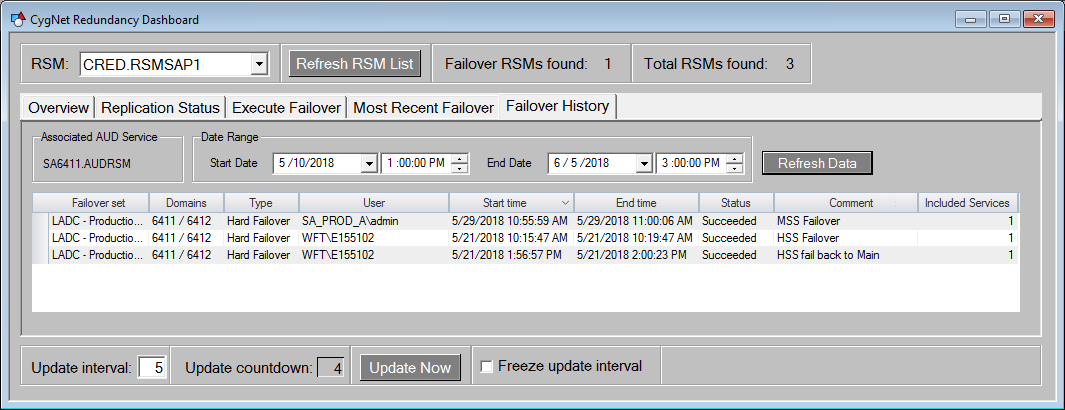
The Failover History page contains the following elements:
| Object | Description |
|---|---|
| Associated AUD Service | |
|
SITE.AUD |
The name of the AUD service associated with the redundant RSM selected for the dashboard. |
|
Date Range |
|
|
Start Date |
Select the start date and time for the date range to be displayed in the Failover History grid below. |
|
End Date |
Select the end date and time for the date range to be displayed in the Failover History grid below. |
|
Refresh Data button |
Click to refresh the data presented on the page. |
|
Failover History grid |
|
|
Failover set |
The two failover sets in a redundant relationship. |
|
Domains |
The two domains associated with the failover sets. |
|
Type |
The type of failover (Hard Failover or Soft Failover). The grid can be sorted by failover type by clicking the arrow in the header. |
|
User |
The name of the user who initiated the failover. |
|
Start time |
The time the failover started. |
|
End time |
The time the failover ended. |
|
Status |
The final status of the failover. |
|
Comment |
The user comment associated with the failover. |
|
Included Services |
The number of services that were included in the failover. Click to view a list of services included in the failover event. Click OK to close the list of Services. |

